Starting things is the hard part. Not the doing, the starting. Making the same set of folders for the fifth time that week. Having a thought on my phone and nowhere to put it, so it quietly disappears.
If you’ve read my posts about ADHD and AuDHD, you’ll know friction at the start of a task is where things fall over for me. So I stopped looking for a cleverer system and went after something simpler: fewer steps between a thought and somewhere safe for it.
That led to two small apps. One for my PC, one for my phone.
App one: Auto Folder Creator
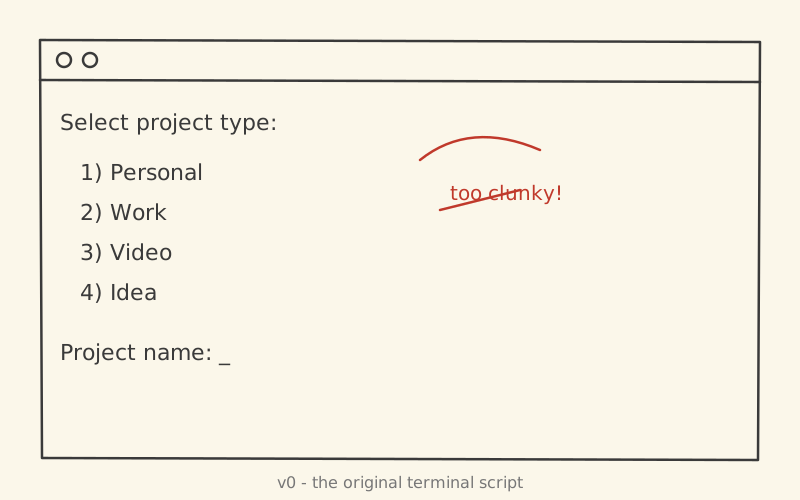
This one started life as a Python script. If you missed it, here’s the original post: hit Caps Lock + D, a terminal pops up, pick a project type, type a name, done.
It worked, but it was a terminal prompt: no preview, no job numbers, and no way to tidy up the folders I’d made before the script existed. I had to run it every single time, it only really lived on one machine, and there’s no Python on my main PC these days. I wanted something clean that felt like a proper app: friendlier to use, and not tied to a terminal window and a script. That’s why it became an Electron app.
Designing before coding
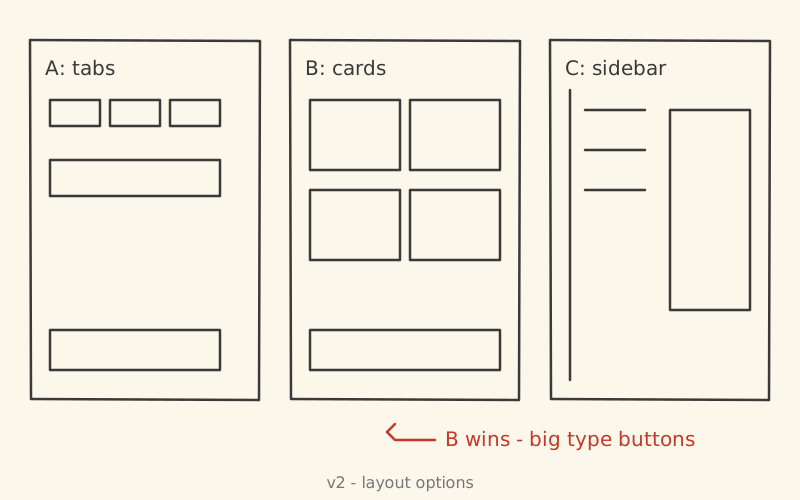
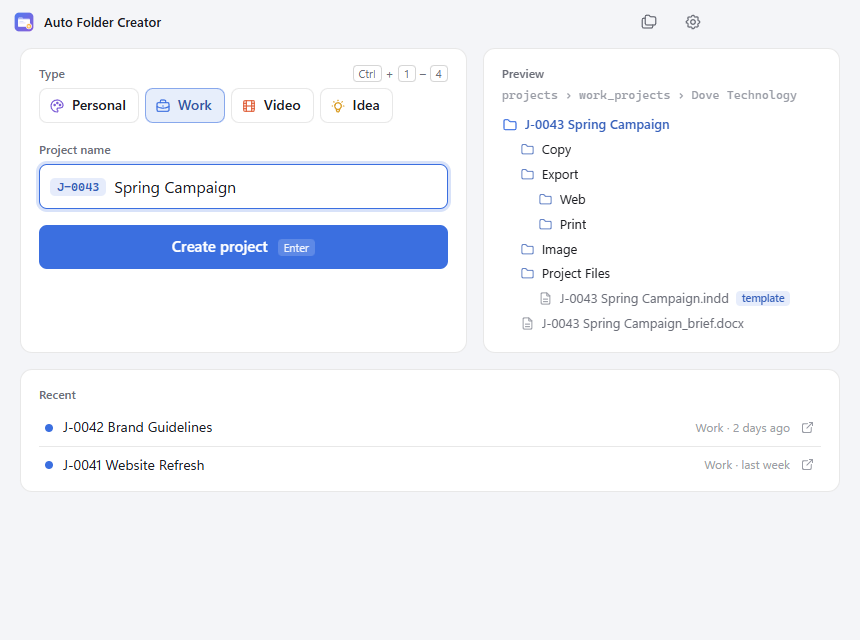
Before I wrote the new app I mocked up the design and agreed the layout first. The result has big type buttons, and a live preview of the folder tree on the right so I can see exactly what I’m about to create.
The decisions that mattered
- Job numbers. Every project gets a number like
J-0043 Spring Campaign, from one shared counter across all types. Each type can switch numbering off. - Never move my files. The “Organise existing” tool numbers old project folders (oldest first), adds any missing subfolders and a brief, but it never moves what’s already inside. And there’s an undo button, because I don’t trust myself either.
- Templates get renamed. A template InDesign file becomes
J-0043 Spring Campaign.inddautomatically. - Keyboard first.
Ctrl+1toCtrl+4picks a type,Entercreates,Escgoes back. Hands never leave the keys.
App two: Vault Capture, for Android
The second problem: I’d have a thought or find a link on my phone and want it in Obsidian now. Adding a to-do or saving a link meant opening the app, finding the right note and scrolling to the right spot. That’s too many steps. I wanted to add a task or a read-it-later link without navigating around Obsidian at all.
So Vault Capture does two jobs and nothing else:
- Task: adds a line to the
## Activelist in my Quick Task note, with a due date (Today, Tomorrow or pick one). - Read later: saves a link into my Read It Later inbox in the vault.
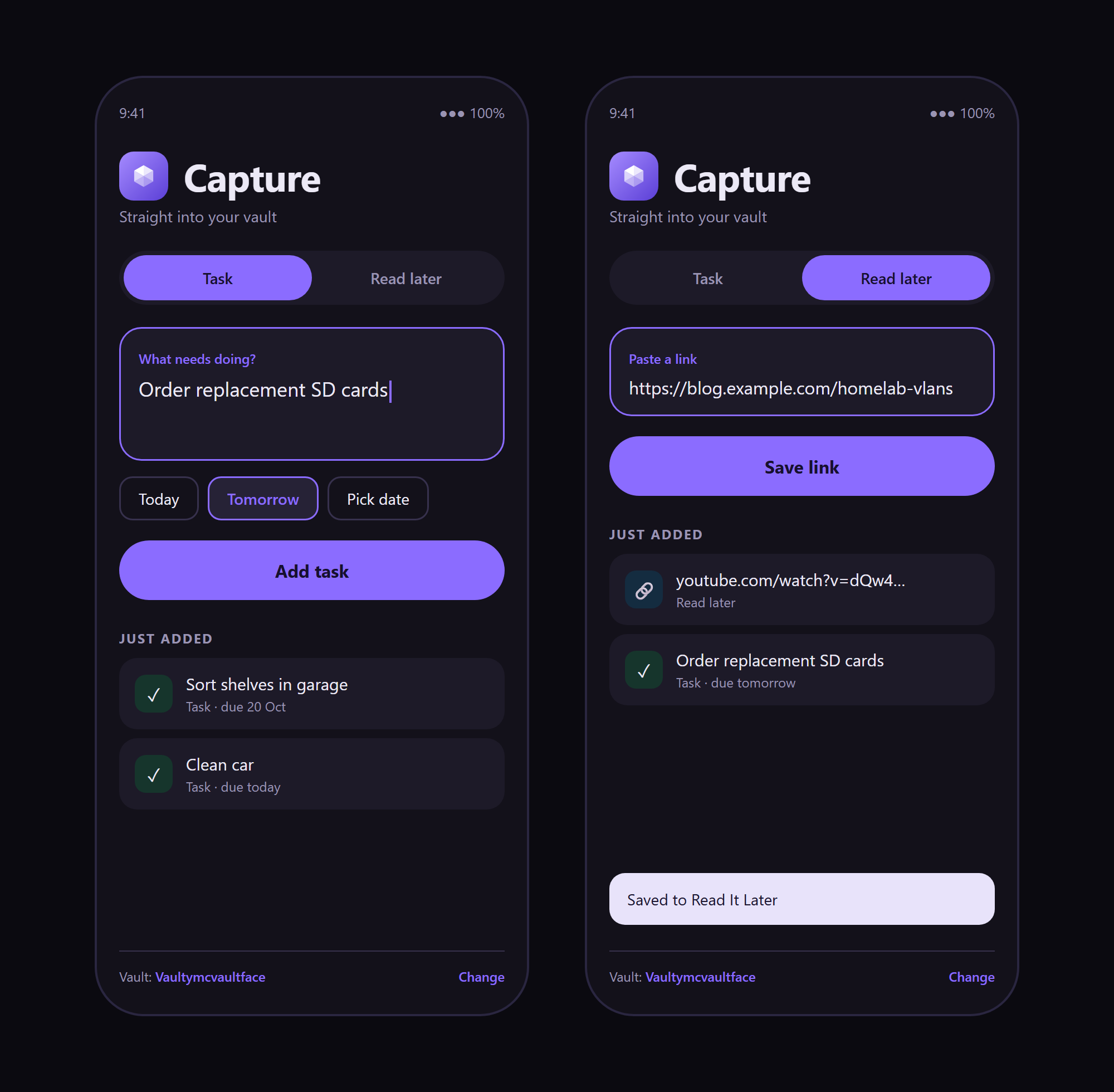
The bit I’m happiest with is that it shows up in the Android Share sheet. See something worth keeping in Chrome, YouTube or Reddit, hit Share, tap Vault Capture, and it’s saved with no screen at all.
It writes plain Markdown straight into my synced vault. No server, no account, nothing to break.
What went wrong (a lot)
Neither app worked first time. Both were also built with tools I’d barely touched, which turned out to be the real adventure.
Learning new programs. The folder app is Electron and Node.js. Vault Capture is Kotlin in Android Studio. I’d used neither properly before, so a lot of this was working out how things fit together as I went.
Android Studio has a seriously steep learning curve. There’s a lot to take in before you write your first line: SDKs, Gradle, emulators and settings everywhere. Then, to test on my real phone, I had to find and switch on developer mode and work out how to get the app from my PC onto the device. None of it was hard once I knew it, but none of it was obvious either.
Troubleshooting bugs. A few real ones from the build:
- My project folder lives in a synced drive, so every
node_modulesand build folder I generated got synced too. That’s thousands of tiny files nobody asked for. - The original script needed separate Personal and Work versions just because of where the folders lived. The new app has a settings screen for that instead.
- On Android, an app can’t just write to any folder it likes. You have to ask the user to pick the vault folder and work through Android’s file-access system, which is very different from just opening a file on a PC.
The lesson I keep relearning: write a test before the bug comes back. The folder app now has tests for creating projects and for the organise tool, so my future self can’t quietly break the thing that touches my real files.
What they have in common
Looking at the two side by side, they’re the same idea:
- Both remove a step instead of adding a feature.
- Both write plain files (folders and Markdown), so nothing is locked in.
- Both were designed before they were coded, so I could see the thing before committing to build it.
What’s next
Both apps are on GitHub: the folder app and Vault Capture. I’ll keep building more tools for my own use. If something annoys me enough twice, it’s probably getting an app.
Small, boring tools beat big clever systems every time. You can see both on my projects page.